FiX: How to resolve Recovery Pending State in SQL Server Database
MSSQL How to resolve Recovery Pending State in SQL Server Database, Recovery Pending in SQL server, SQL server issuesProblem Description:
SQL sever database went into pending recovery state and it could be due to multiple reasons.
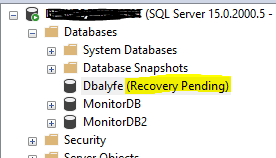
- The database is not cleanly shut down. In other words, one or more unfulfilled transaction is active at that time and the transaction log file has been deleted.
- Users attempted to transfer the transaction log files to a new drive to solve performance issues. But, this may leads to corruption of log files.
- Due to inadequate memory space or disk storage, database recovery cannot be started.
Solution:
Follow below steps to to resolve this issue:
ALTER DATABASE Dbalyfe SET EMERGENCY;
GO
ALTER DATABASE Dbalyfe set single_user
GO
DBCC CHECKDB (Dbalyfe, REPAIR_ALLOW_DATA_LOSS) WITH ALL_ERRORMSGS;
GO
ALTER DATABASE Dbalyfe set multi_user
GO
Once above steps are completed successfully, run below command to check the database status.
SELECT name, state_desc from sys.databases